Manufacturing plan: purchasing for a batch of several items at once
The “Plan” mode turns the single-item calculator into a batch planner: several independent items with their own runs and ME, a shared assembly slot and shared factories, consolidated buy/build/react lists for everything plus per-ship profit. Screenshots follow a worked example on four different battleships: how to build the list, fold purchasing into one multibuy and read the total for the whole batch.
Key takeaways
- The “Plan” mode on /industry costs out a batch of several items at once: each with its own runs/ME, shared component and reaction factories, and one net shopping list for everything.
- Net merge: if several items share a built component it is built in ONE job for all of them (less install fee and surplus), and the mineral purchase is consolidated into one list; profit and m³ are computed for the whole batch.
- The plan total is a batch total: per-item profit, m³ on two legs (raw inbound / finished outbound), job waves across slot pools. Free — a plan of up to 2 items; unlimited is in the Pro subscription.
Why “Plan”: the whole batch in one calculation
The single calculator costs out one item. But a manufacturing session is usually a batch for sale: several different ships in one go. Costing each one separately and then adding up mineral and component lists by hand is slow and error-prone. The “Plan” mode (the “Single | Plan” switch at the top) rolls the whole batch into one calculation: you enter a list of items, and the engine folds them into a single net demand and hands back consolidated buy, build and react lists for everything at once.
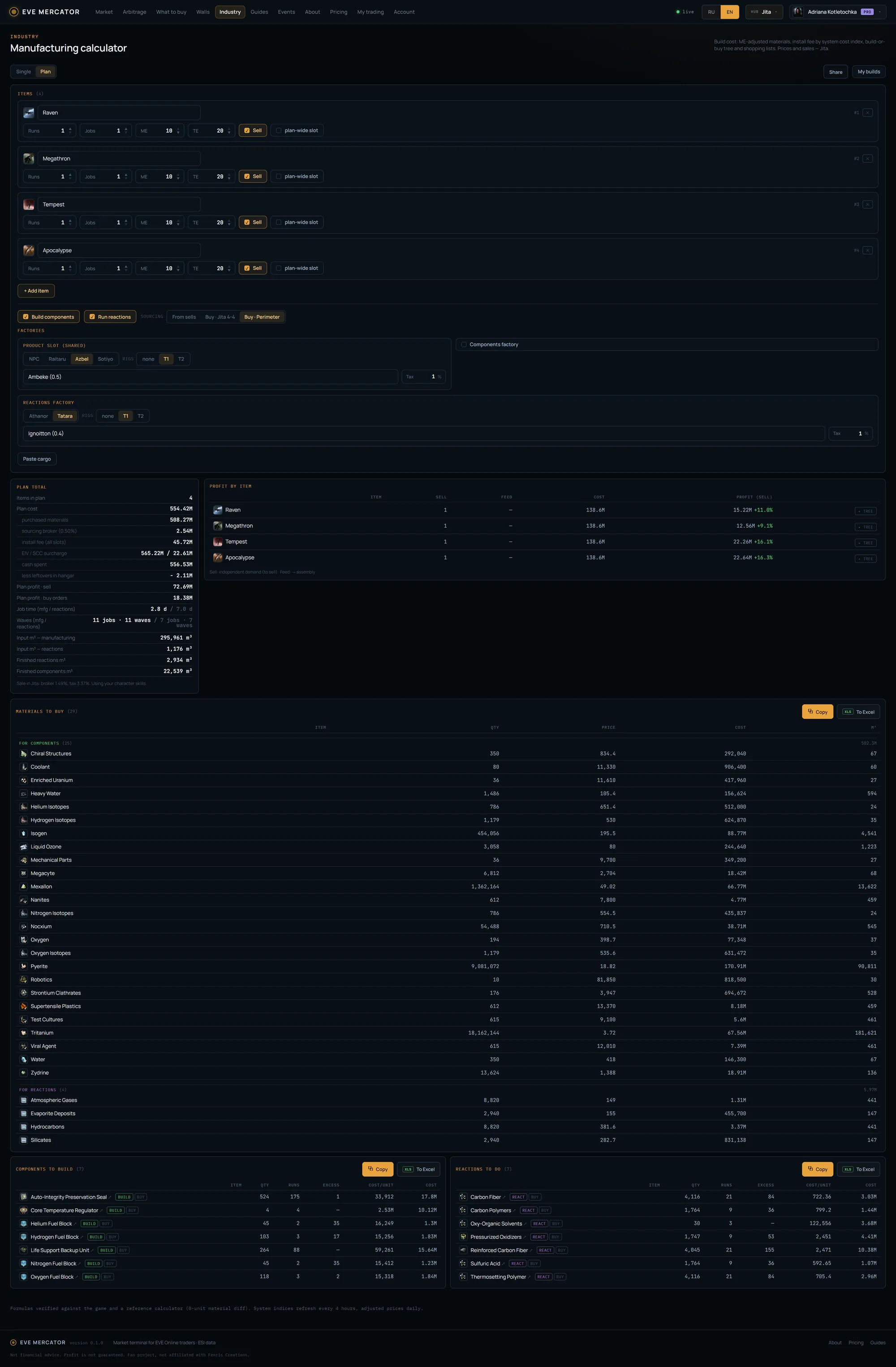
The worked example uses four different battleships, each built on its own and sold. In the full-page screenshot: the configurator on top (the ship list and the shared factories), then the batch total, per-ship profit and the three consolidated lists. We break it down block by block below.
Targets and shared factories
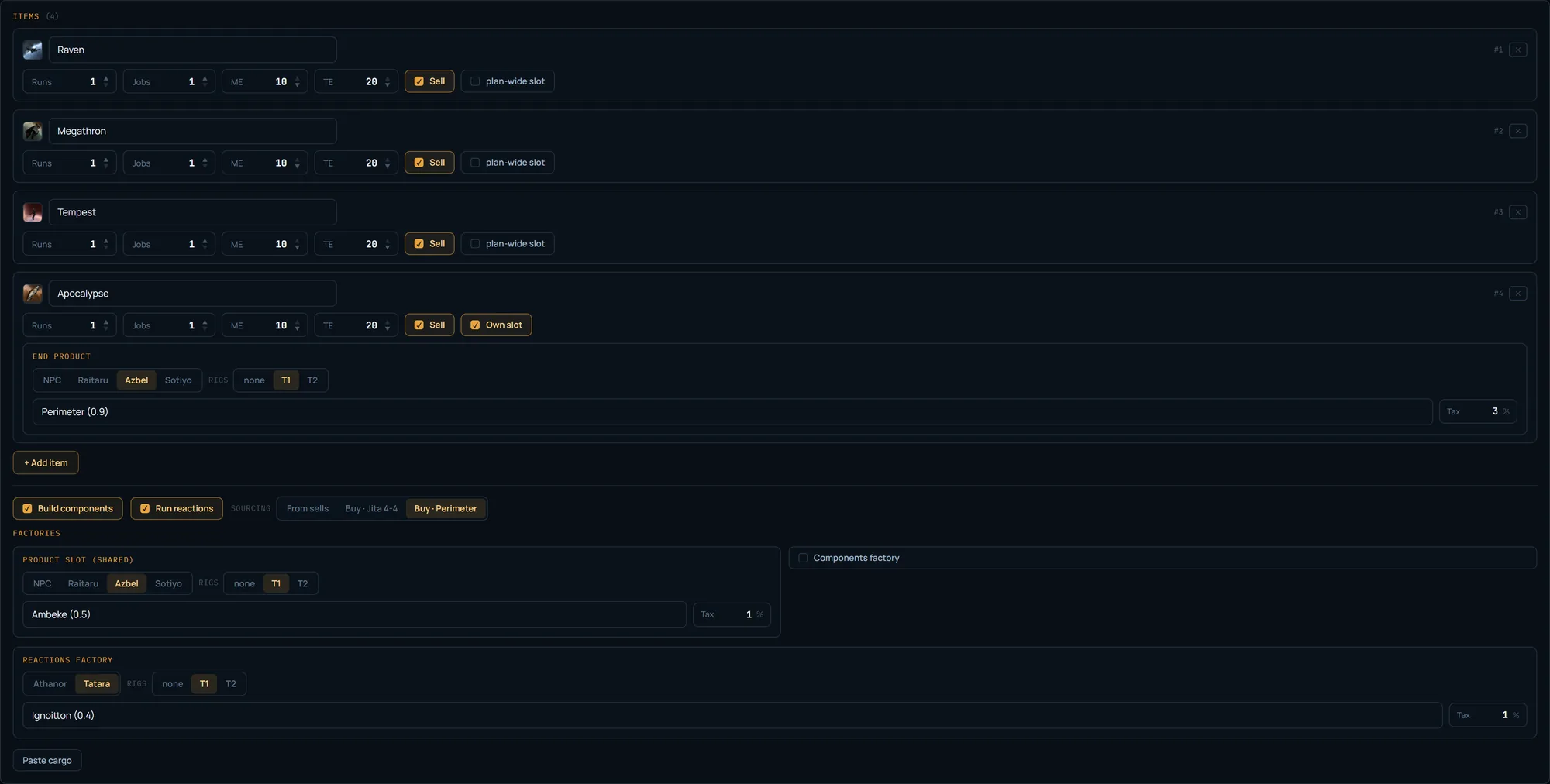
The top block is the target list and the factories. Each target row: an icon, ship search by name, runs/jobs, ME/TE, a “Sell” checkbox and an “Own slot” toggle. The “+ Add item” button adds a row, inheriting the previous one’s parameters. “Sell” marks whether the ship counts toward the profit total; “Own slot” gives a ship a separate assembly structure (otherwise the plan’s shared slot). With more than four targets the rows collapse to a single line, expanded with a click.
Below is the “Factories” block: the shared assembly slot (where all ships are assembled), the component and reaction factories, the plan-wide “Build components” / “Run reactions” toggles and, for T2 targets, “Invent the BPC” (invention datacores are consolidated into the whole-plan purchase), and the material sourcing side (from sells / Jita buy orders / Perimeter buy orders). All of this is set ONCE for the whole plan: the build system, rigs, tax and sourcing side apply to all the ships at once. The system matters more than the structure — Jita’s index is ~19% vs a fraction of a percent in a quiet system nearby, so “build in a quiet system, sell in Jita” works for the whole batch at once.
T2 invention across the plan: datacores merged, decryptor per target
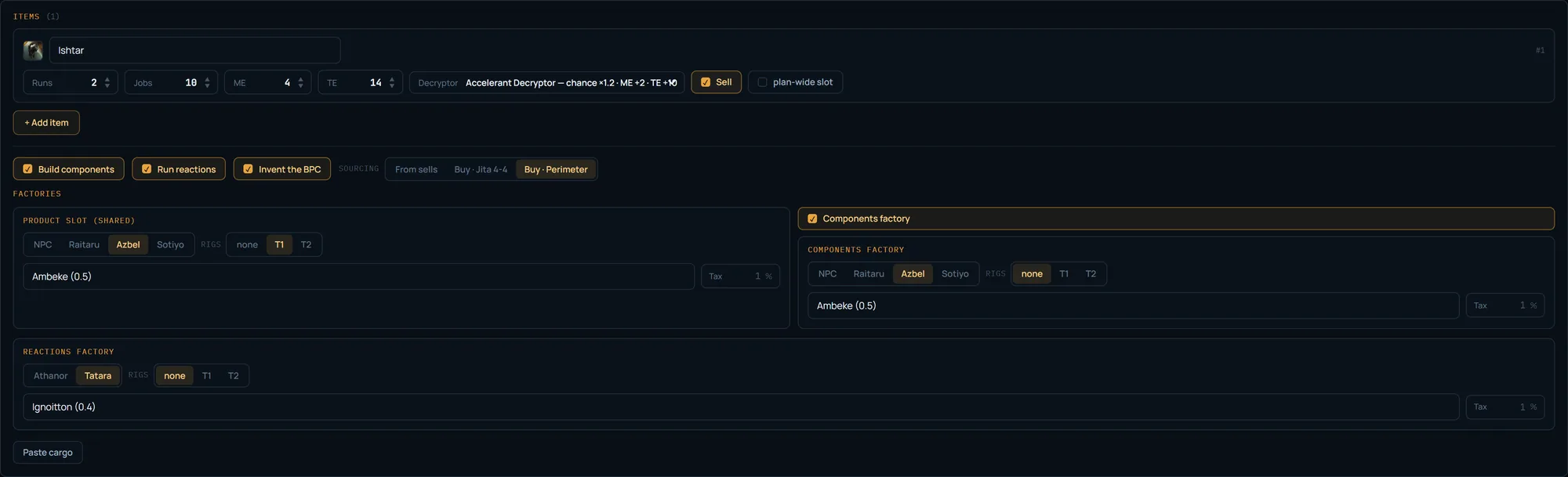
If the batch has T2 ships, each such target’s blueprint is invented rather than bought. The plan-wide “Invent the BPC” toggle in the “Factories” block turns invention on for the whole plan: datacores are added to the shared buy list by expected attempts and consolidated, like minerals — one row for the combined demand rather than once per ship. The decryptor is chosen in the target’s own row (each T2 item can have its own): in the screenshot the Ishtar uses an Accelerant — it auto-filled the ME 4 / TE 14 fields (invented BPC base 2/4 plus the decryptor shift) and changes the chance and the runs on the resulting BPC. The full breakdown of invention itself — datacores, the eight decryptors, the effective chance — is in the calculator guide.
Invention in detail — in the calculator guide →
Materials to buy: one purchase for all the ships
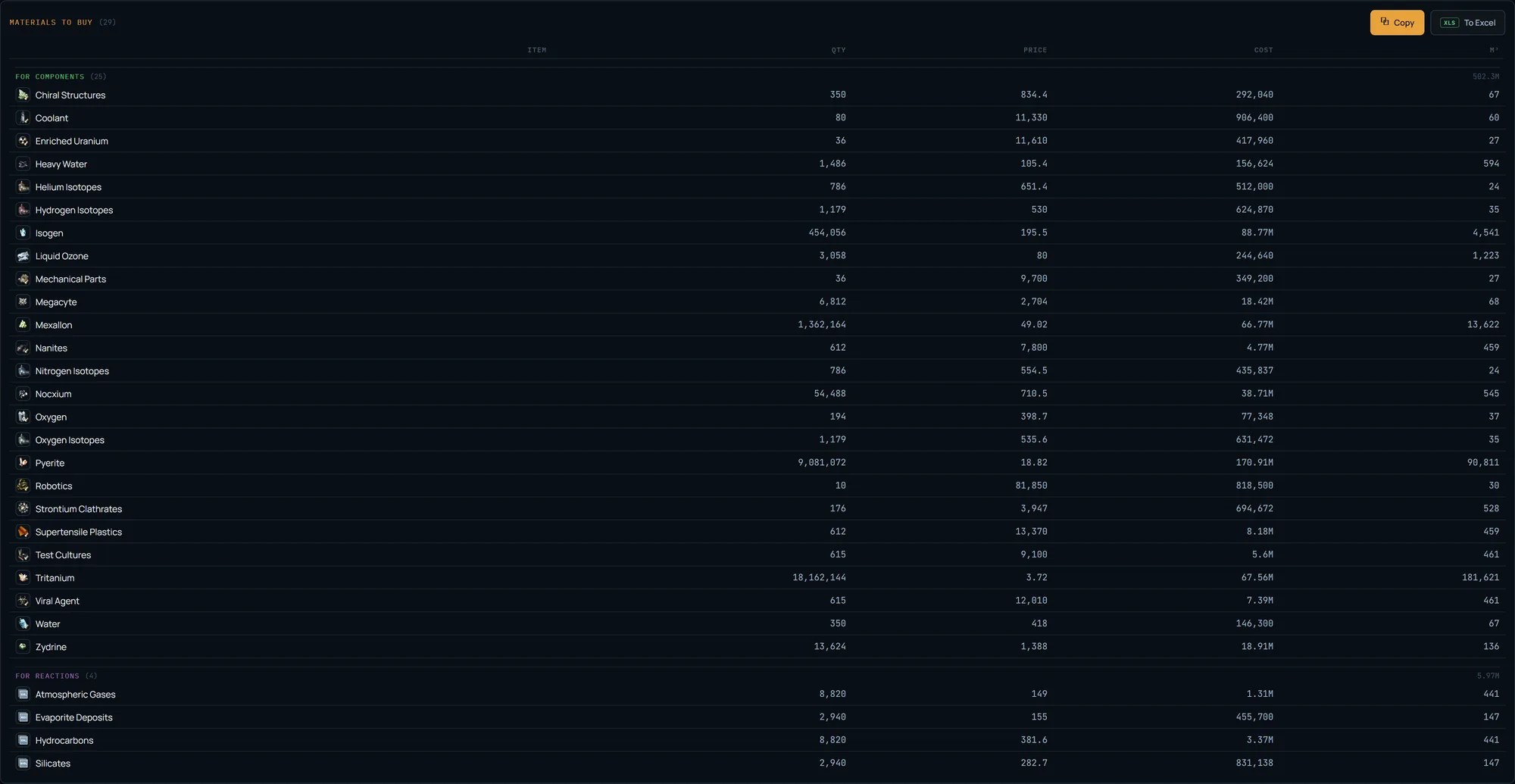
The first consolidated list is everything you buy: raw materials (minerals, gas) and the components you chose not to build, across all ships at once. If Tritanium is needed by each, the list has one row with the combined quantity, not four. When both components and reactions are in play, the list splits into “For components” / “For reactions” / “For both” stripes with their own subtotals. Price is shown at full precision, cost and m³ alongside.
The “Copy” button hands the list off in the in-game multibuy format (name [TAB] quantity): paste it into the multibuy window and buy the whole batch in one purchase. “To Excel” exports an .xlsx. Cargo paste (what is already in your hangar) recomputes the list to the shortfall with Needed / Have / To buy columns — as in the single calculator, only for the whole plan.
Components to build: a shared component in one job
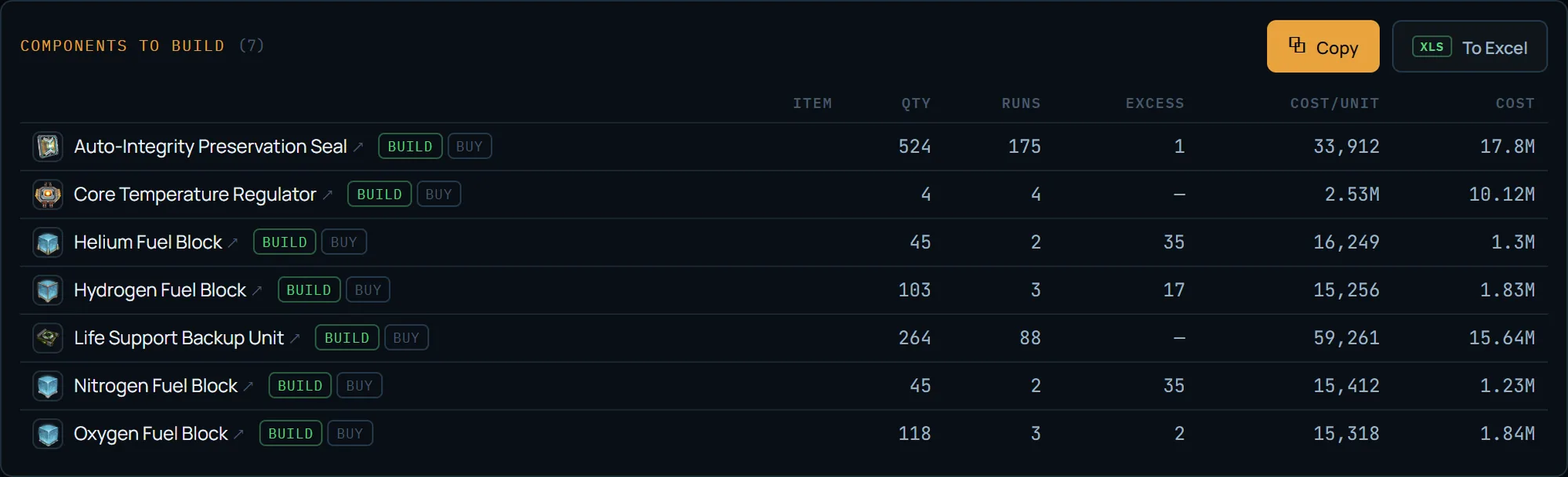
The second list is what to build at the manufacturing line: components with their runs, surplus and cost, consolidated across the whole batch. This is where the net-merge effect shows: if several ships share a component, it appears in the list as ONE row for the combined demand and is built in one job — one install fee, minimal rounding and surplus, instead of one job per ship. Each row has a build↔buy toggle, as in the tree: a single node can be flipped to buying it ready straight from the list.
The ↗ icon on the name opens the component’s full calculation in a new tab with the same settings — handy to check whether it is worth making on its own.
Reactions to do: reactions for the whole plan
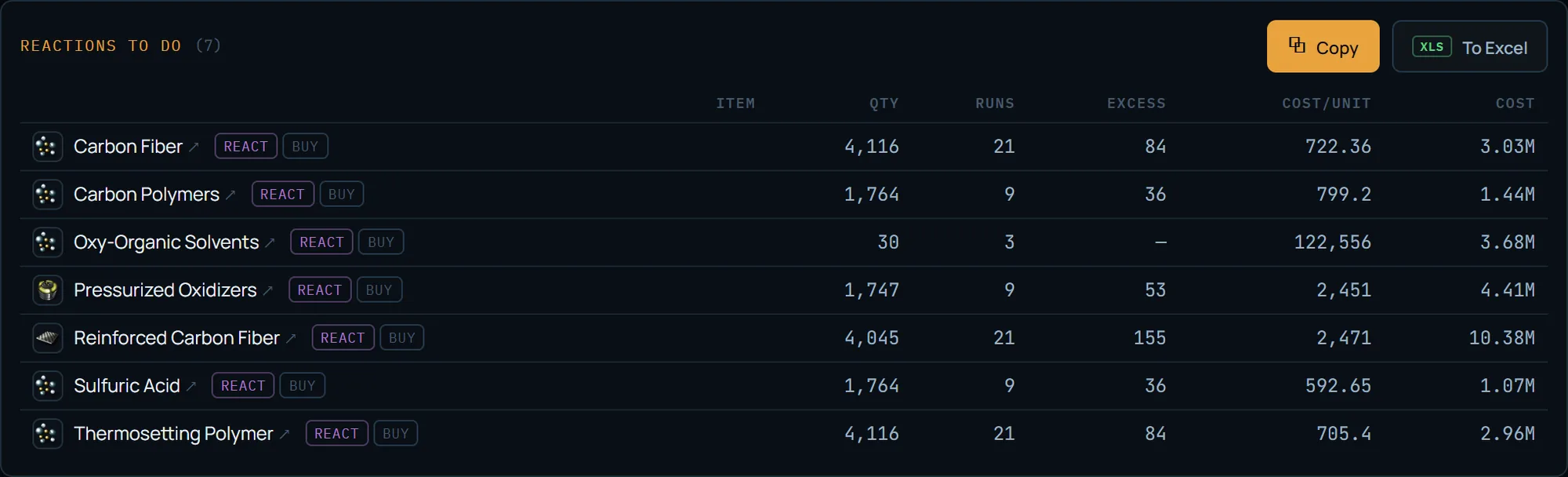
The third list is reactions: the same columns (runs, surplus, cost) and a react↔buy toggle in the row, consolidated across the batch. Reactions run only in 0.4-security systems and below, on a separate slot pool and a second logistics leg — the reaction slot is set in “Factories.” A lumpy reaction (cooked in batches of 100+) is computed once for the whole plan, so the net surplus is smaller than if each ship pulled it separately.
The plan total: cost, m³, waves, time
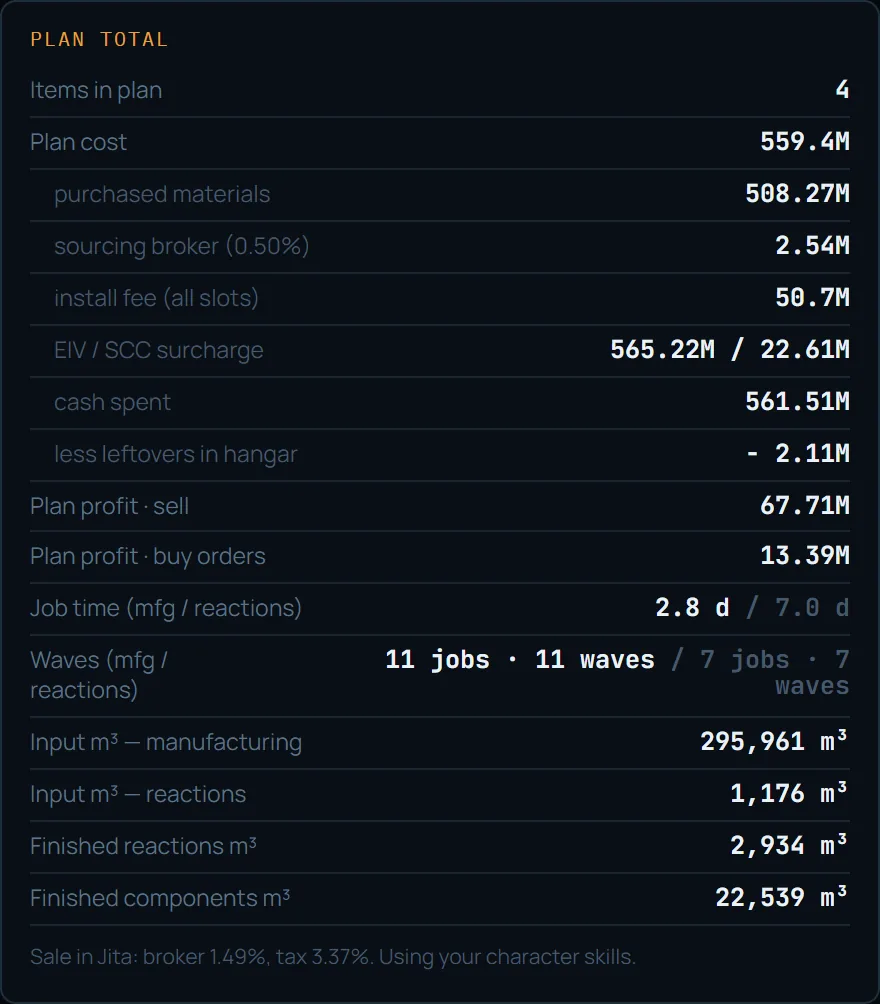
A “per-unit” cost is meaningless for a set of different ships, so the plan summary is a batch total. At the top: the cost of everything produced, install fee across all jobs, minimal surplus and the plan profit on two lines — sell order and buy-order dump, summed across all sellable ships. Non-sellable targets (with “Sell” unchecked) get their own cost line.
Below — m³ on two legs for the whole plan: INBOUND raw to the factories and OUTBOUND finished reactions/components to assembly (pick the ship by the total weight). When logged in — job time per leg and “waves”: how many parallel jobs are needed and how many rounds they take in your slot pools. Manufacturing and reactions are independent pools (widened by Mass Production / Mass Reactions skills): if waves equal jobs, you currently have a single slot in the pool.
Profit per ship
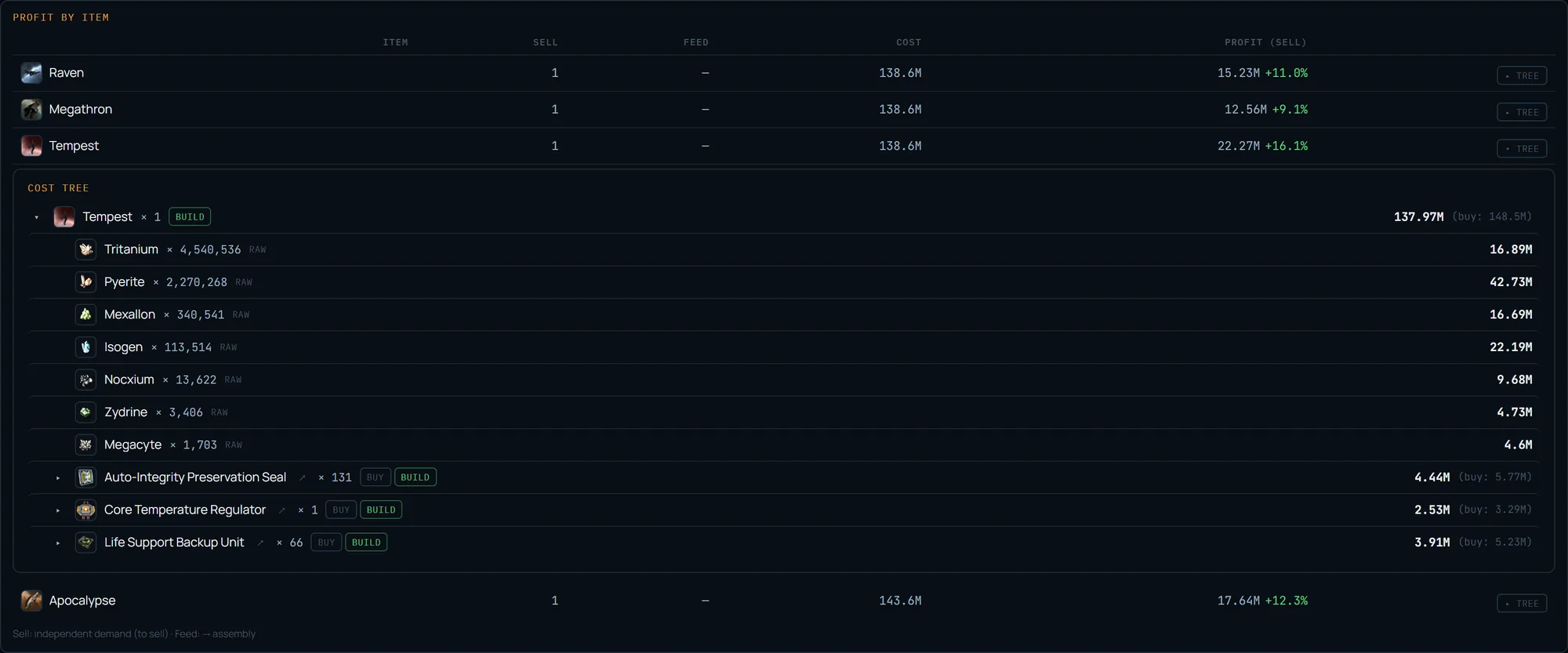
A separate table — profit per item: the quantity to sell, the cost (with a share of the sourcing broker) and the sell-order profit with margin. The sum of profit across sellable ships is the plan total; non-sellable ones are pure cost. The “feed” column is filled only if an item is itself a component of another in the plan — for independent ships it is a dash.
Any row expands into its own cost tree — the same buy/build/react buttons and drill-down as in a single calculation. So one plan shows both the batch overview and a breakdown of each ship on its own. A plan is saved in “My calcs” (with a “plan” badge) and shared by permalink just like a single calc. Note: a plan is a forecast before you build; the actual profit on what you have ALREADY built and sold, with the real cost from your jobs, is then in “My Trading” — both personal and corporate jobs count (a corporation is linked on the Account page with a character holding the Factory Manager and Director roles).
The actual result after building — in “My Trading” →
What is free and what Pro adds
The single “calc” is always free, and so is a plan of two items. The third item and beyond in a plan is in the Pro subscription: on the second target the “+ Add item” button turns into a 🔒 and leads to the pricing page. If you open someone’s large-plan permalink on a free account, the first two items are computed and a banner appears offering to unlock Pro — the plan does not break, it just shows the available part.
The logic is simple: costing out a specific build is free (the whole calculator, tree, lists, both sale sides, EVE login for skills). Planning a whole batch for sale with consolidated lists is a serial producer’s working tool, and it is in Pro. The mechanics and formulas are free everywhere — Pro sells the convenience of planning at scale, not access to the numbers.

Plan your own batch
Add your items, set the shared factories, and get consolidated buy/build lists plus per-ship profit. Free — a plan of up to 2 items; the full batch is in the Pro subscription.
FAQ
How do I compute purchasing for several items at once?
Switch /industry to “Plan” mode, add items as a list with their own runs and ME and set the shared component/reaction factories. The engine folds the whole plan into a single net demand and returns one shopping list with minimal surplus.
How is a plan different from several separate calcs?
A plan costs the whole batch in one pass: the shared assembly slot and sourcing side are set once, purchasing is folded into one net list (a combined quantity per material, not once per item), and profit is shown per item plus a total for the whole batch. Separate calcs do not consolidate this — you would have to add the lists up by hand.
How many items are free in a plan?
A single calculation is always free; a plan is free up to 2 items. The third item and beyond in a plan is in the Pro subscription. The mechanics and formulas are free everywhere; Pro sells the convenience of planning at scale.