What it costs to build: the manufacturing cost calculator in EVE
A full tour of the manufacturing calculator: how to find the build cost of any item in a minute — ME-adjusted materials, install fee from the system cost index, a build-or-buy tree and multibuy-ready shopping lists. Screenshots follow one worked example on the Ishtar: where to build, what to buy, what to react, and what it earns when sold in Jita.
Key takeaways
- Build cost = ME-adjusted materials + sourcing broker + install fee + blueprint; per unit you compare it not with the market price directly but with break-even = cost ÷ (1 − broker − tax).
- Install fee = EIV × (system cost index − structure bonus + tax + 4% SCC). The main lever is the system (Jita index ~19% vs a fraction of a percent in a quiet system nearby), not the structure type.
- Selling by sell order — tax + broker; dumping into a buy order — tax only; buying off sell orders — no fees, by your own buy order — plus broker (0.5% structure fee in Perimeter instead of the NPC one).
- Reactions run only in 0.4-security systems and below, on a separate slot pool and a second logistics leg. Skills change fees and job time but not material cost (post-Crius mechanics).
- For a T2 item the blueprint is invented rather than bought: the “Invent the BPC” toggle adds datacores by expected attempts, an invented BPC starts at ME2/TE4, and a decryptor (1 per attempt) shifts the chance, BPC runs and ME/TE.
What the calculator computes — and why it beats the in-game breakdown
The game client shows the material list for a job and an estimated install cost. Everything after that is manual: expand each component down to raw materials, fold in reactions, add the sales broker and tax, work out what is cheaper to buy ready-made. The manufacturing calculator does all of it in one pass — from the root item down to the last mineral, with both sale sides and live Jita prices.
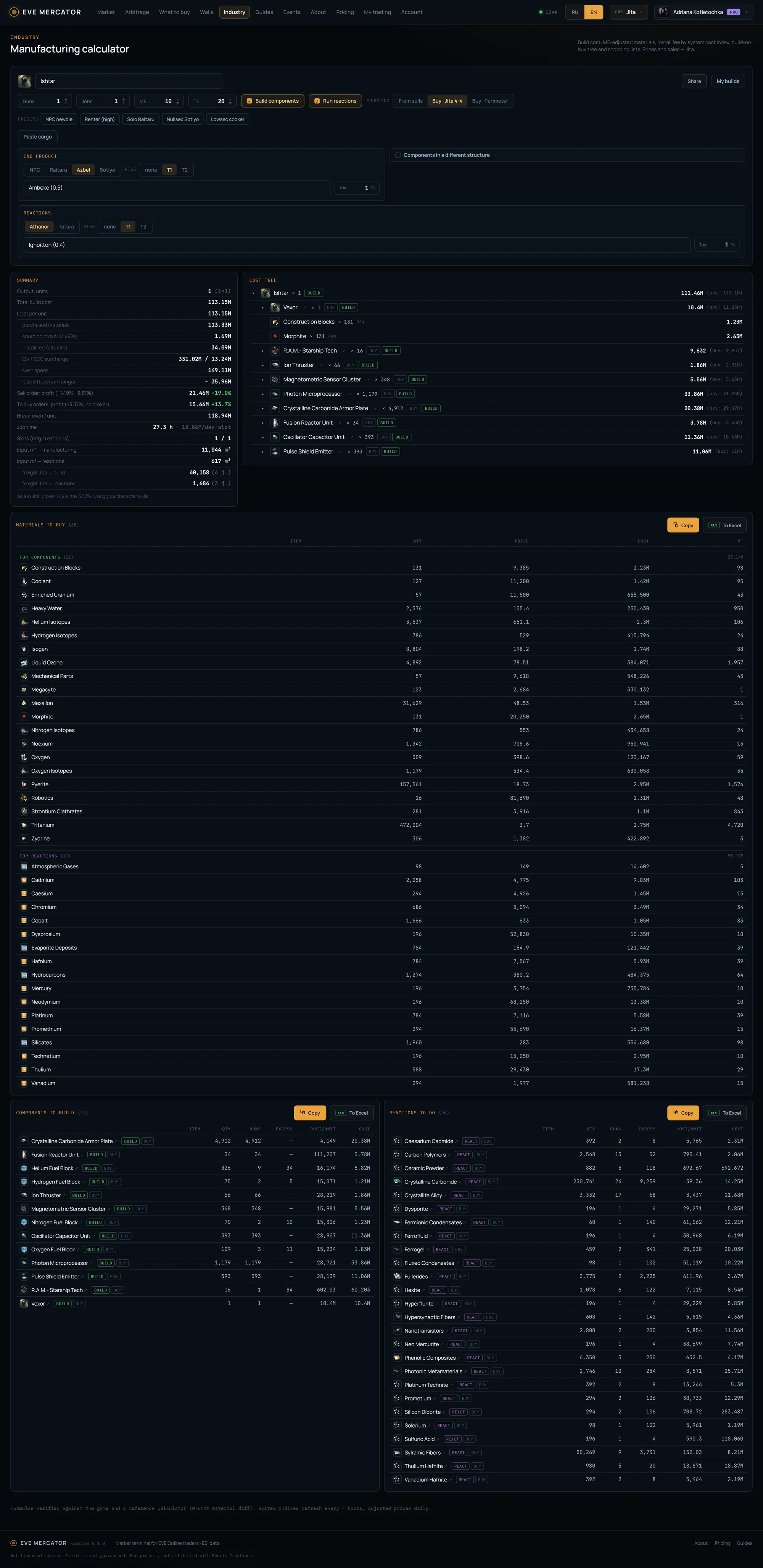
The screenshot shows this guide’s worked example: an Ishtar at ME 10 / TE 20, components built in-house, reactions run in-house. Summary on the left (cost and profit), the cost tree on the right, three shopping lists below. It is all free; logging in via EVE SSO fills in the character’s real trading and industry skills, though material cost itself does not depend on skills.
Quick start: item, parameters, a preset
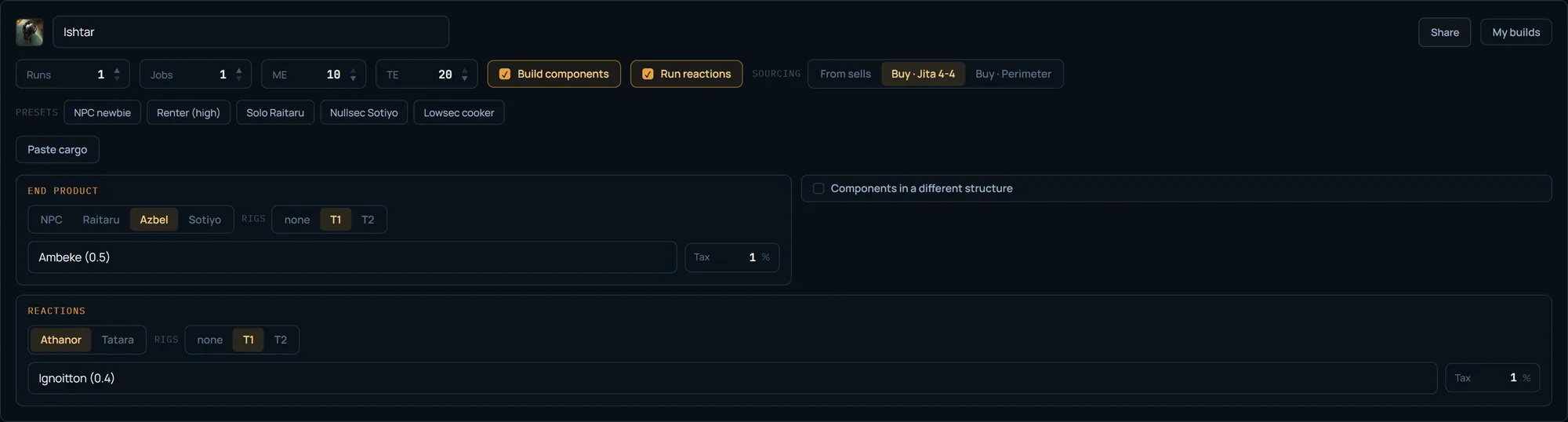
Search matches the item name, not the blueprint: type “Ishtar” and pick it (reactions carry a “reaction” badge). Then four fields: runs (passes per job), jobs (how many in parallel), ME and TE. ME 10 / TE 20 is the standard for a bought, fully-researched T1 blueprint copy; for T1 we assume the print is bought ready rather than researched. For a T2 item the print is invented, not bought — base ME2/TE4 and a separate invention toggle (section below). TE affects job time only, never materials.
The two toggles on top are the global build-or-buy: “Build components” expands components into the tree instead of buying them ready; “Run reactions” adds a reactions slot and cooks the reaction inputs. The “Sourcing” switch sets where materials come from: off sell orders instantly (dearer, no fees), via your own buy order in Jita (cheaper, wait, plus broker), or on the Perimeter Keepstar (a 0.5% structure fee instead of the NPC broker). The persona presets set up structures for a play style in one click — then you fine-tune by hand.
Where to build: the system matters more than the structure
The main build fee is the install fee: EIV × (system cost index − structure bonus + facility tax + 4% SCC). EIV is an estimated value from base material quantities (ME does not reduce it), computed on averaged adjusted prices. The only part of that formula you can cut is the index term, and the system choice cuts it. Jita’s cost index is ~19%; a quiet system nearby is a fraction of a percent — a difference of tens of times. In our example the install fee came to 33.13M on an EIV of 331M — and that is already on a live system, not in Jita itself.
The structure type (Raitaru / Azbel / Sotiyo) is mostly a job-size gate: sub-caps, capitals, supers. The structure’s own role ME bonus is the same 1% on all three, so paying up for a Sotiyo pays off only when you need its size. But that one percent isn’t the only thing cutting materials: the structure’s rigs cut far more — in the calculator the rig tier (none / T1 / T2) is set per slot. The rig bonus is multiplied by the system’s security (×1.0 in high-sec, ×1.9 in low, ×2.1 in null and wormholes), and an NPC station has no rigs at all. So choosing a location is not only a quiet system for the index, but also security and rigs for materials.
The cost index shows right in the system dropdown — open the list and compare candidates by eye. Hence the classic pattern: haul materials from Jita, build in a quiet system nearby, sell in Jita. The 4% SCC and the facility tax are always there — no system choice removes them.
Guide: where to build — rigs, security and choosing a system →
The summary: build cost and the two sale sides
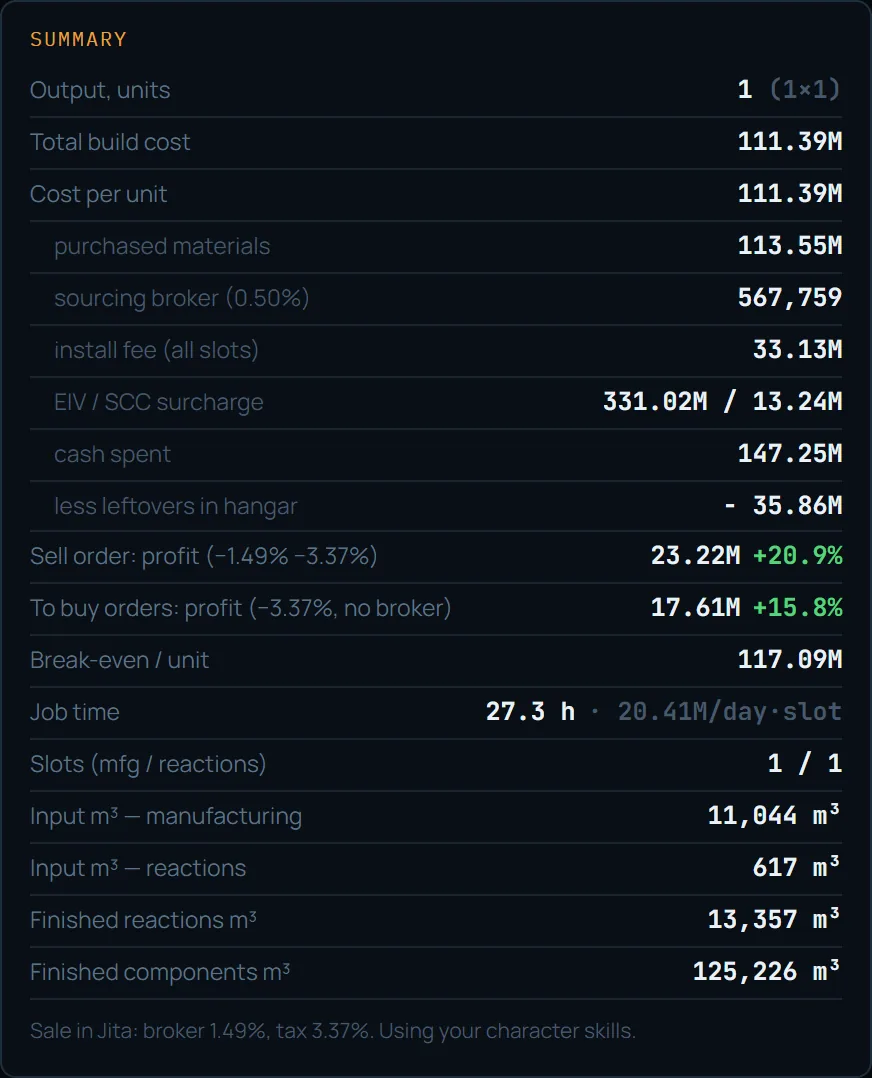
The top of the card is the build cost: total and per unit (the number to compare against the market price). Below it, the components: purchased materials, sourcing broker (if you buy via orders), install fee and the reference EIV / SCC pair. Profit shows on two lines. “Sell order” is selling with your own order: higher price, but minus broker and tax, and you wait (here +23.22M, +20.9%). “Into buy orders” is dumping into someone’s buy order: instant, no broker, tax only (+17.61M, +15.8%). Break-even is the lowest sell-order price at which the calc reaches zero (117.09M); below it you lose.
The “cash spent / minus surplus in storage” pair appears on rounding overproduction — common when a reaction runs in a batch of 100+ but you need less. Cash spent is all ISK in (147.25M), full batches included; the surplus (−35.86M) is subtracted back, because the overproduced part stays as inventory for later builds or sale and does not belong in the cost of what you made. At the bottom: job time and ISK per day-slot, available slots (when logged in), raw input volume on two lines (manufacturing and reactions) and, when you react or build, the finished reactions and components volume to haul out. The rates line notes whether fees were computed from the character’s skills or the guest public rates.
Fees in plain terms: who pays, when, and for what
The fee confusion clears up with one matrix. Sales tax is paid only by the seller and only on a sale. The broker is charged for placing any order — sell or buy; on an instant deal (bought off the market, dumped into someone’s buy order) there is no broker. So: selling by sell order — tax + broker; dumping into buy orders — tax only; buying off sell orders — zero fees (but you pay the sell markup); buying by buy order in Jita — broker; buying by buy order in Perimeter — a 0.5% structure fee instead of the NPC broker.
Rates depend on skills: Accounting lowers the tax, Broker Relations and standings lower the broker. On the guest public rates (7.5% tax, 3% broker) a full cycle eats noticeably more than on trained skills. Hence break-even: build cost ÷ (1 − broker − tax). It is the floor below which a sell order goes negative, and it — not the bare build cost — is what you compare against the current market price.
More on spread, margin and fees →
The cost tree: build or buy each node
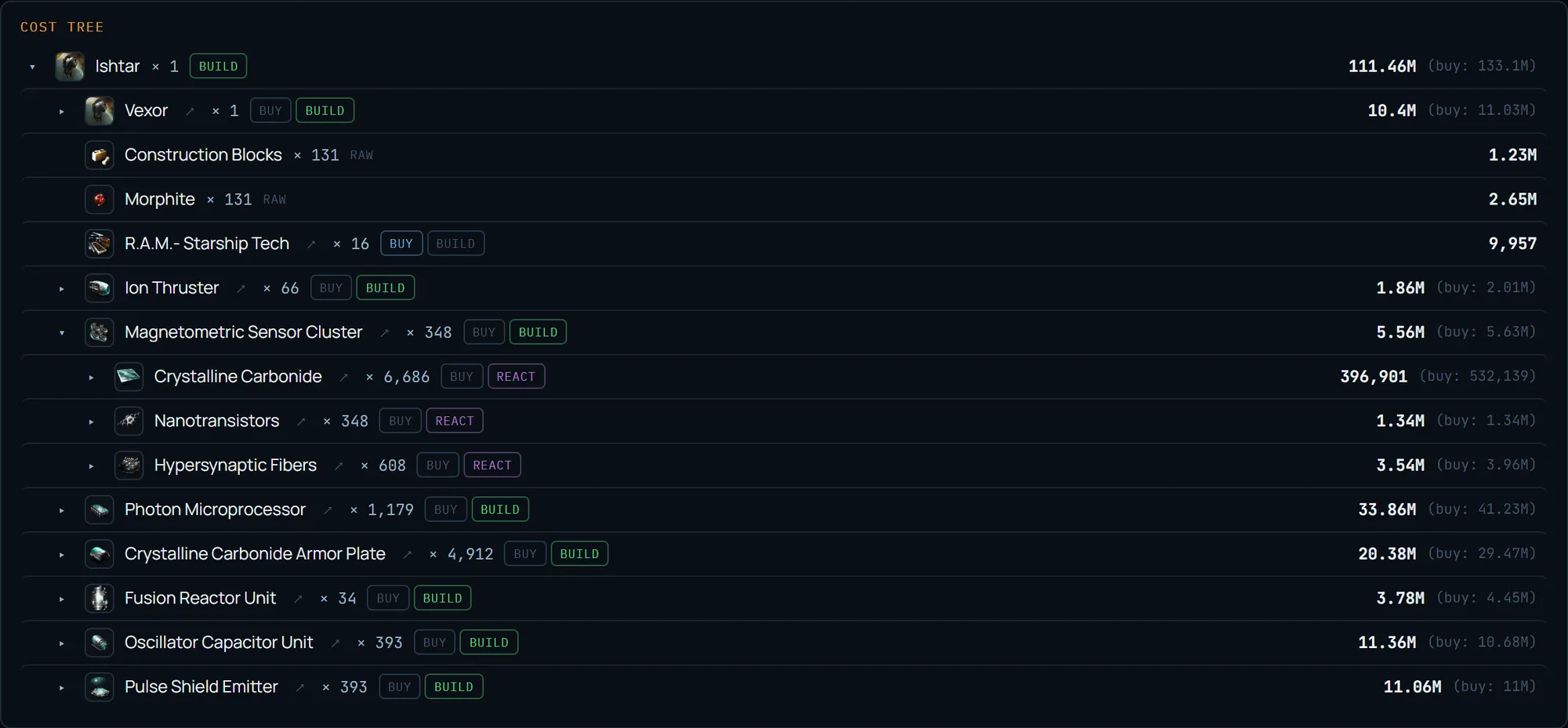
The tree expands the item recursively: product → components → their materials → reactions → raw. Every buildable node has buy / build / react buttons, and the “(buy: …)” in brackets shows what buying it ready would cost — so you see at a glance where building beats buying and where it does not. The global toggles set the default decision, and any node can override it locally: in the screenshot R.A.M.- Starship Tech is switched to “buy” while the rest is built. Clicking the active decision again clears the override.
By default only the root is expanded — capital trees are huge, so levels open on a click of ▸. The expanded Magnetometric Sensor Cluster branch shows the next level: reaction inputs (Crystalline Carbonide, Nanotransistors, Hypersynaptic Fibers) with the “react” decision. An avg flag on a node means there is no Jita book price and the universe average was used. The ↗ icon opens the full calculation of that component in a new tab with the same settings — handy to check whether it is worth making and selling on its own.
Reactions: only in 0.4-security systems and below
The “Run reactions” toggle adds a third structure slot and expands reaction inputs from moon materials and gas. A reactor runs only in low-sec, null and wormholes — in high-sec the job will not start. The reactions slot flags this in red if you pick a system 0.45 or above: in the screenshot the Athanor was set to Perimeter (0.9) and the calculator warns that a reactor will not run in high-sec. The fix is a system 0.4 or below.
Reaction formulas have no blueprint ME/TE — the only saving is rig × security multiplier, and reaction slots are a separate pool from manufacturing (two independent pools, up to 11 each). Reactions are a second logistics leg: inputs are hauled to the reaction system apart from the manufacturing ones, which is why the summary shows volume on two lines (manufacturing m³ and reaction m³). The reaction structures are the Athanor and the Tatara; the Tatara gives −25% time, and neither has a job-cost bonus.

T2 invention: datacores, a decryptor and the ME2/TE4 base
For T2 items the blueprint is not bought ready — it is invented from a T1 BPC and datacores, and that is a separate cost line. When a T2 product (module, ship, drone) is selected in search, an “Invent the BPC” toggle appears in the configurator. Switched on, it adds datacores to the buy list by expectation: how many attempts are needed on average for the required number of BPCs at the invention chance with skills V. The summary gains a “BPC invention (datacores)” line — the datacore cost amortized over the job output, next to the install fee and materials; its tooltip shows the effective chance, the average attempt count and how many BPCs of how many runs come out.
Next to it appears a “Decryptor” select — an optional consumable, one per attempt (success or failure), that changes the invention outcome: chance, the number of runs on the resulting BPC and its ME/TE. An invented BPC starts at ME2/TE4 (not ME10/TE20 like a bought T1), so selecting a T2 product snaps the ME/TE fields to 2/4, and a chosen decryptor shifts them automatically — the option shows all four modifiers (chance ×, ME, TE, runs). Eight decryptors from the SDE plus “no decryptor”: Accelerant raises runs and ME, Attainment the chance, Process gives the most ME. Datacores and the decryptor land in “Materials to buy” with the rest of the inputs, so purchasing still folds into one multibuy.
What invention costs: the summary line and the thin T2 margin
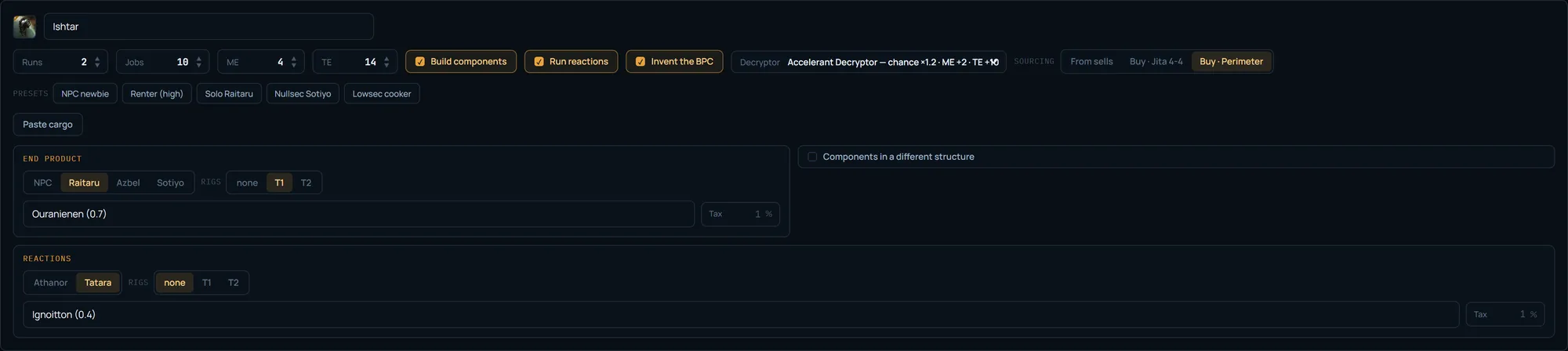
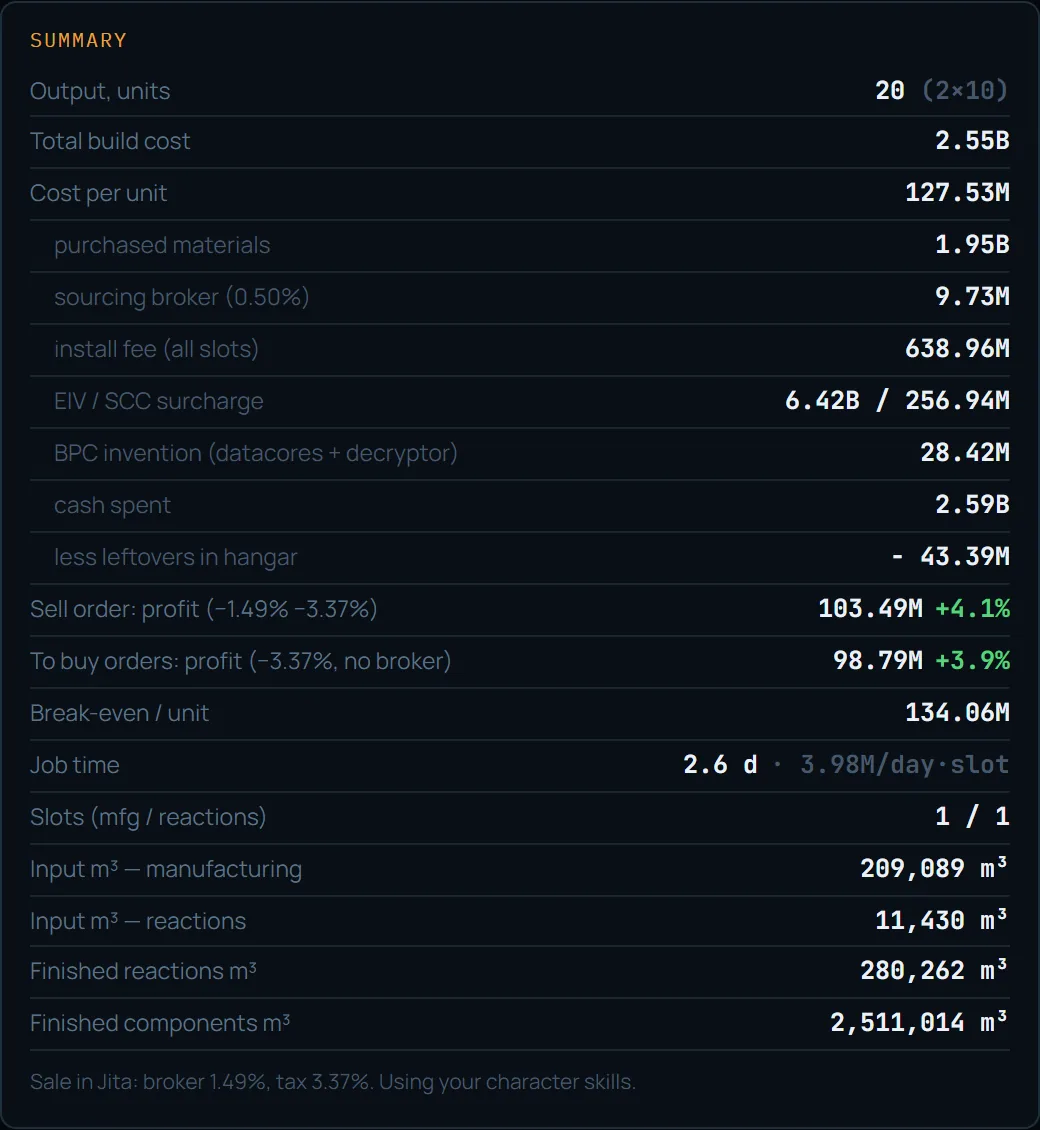
With invention on, the summary gains a “BPC invention (datacores + decryptor)” line — the cost of datacores and the decryptor by expected attempts, amortized over the job output. In the screenshot of the same T2 build (Ishtar, 2 runs × 10 jobs = 20 units, an Accelerant decryptor) invention costs 28.42M for the whole batch, the cost is 127.53M per unit, break-even 134.06M, +4.1% profit via sell order. That is the full build cost now: materials + sourcing broker + install fee + invention, all live.
Note the margin: an invented BPC starts at ME2/TE4 (here 4/14 with the decryptor), not the ME10 of a bought T1, so it eats noticeably more materials and the profit is thinner than in the base example above. For T2 that is normal — the margin rests not on a cheap build cost but on the price of the finished item; the calculator shows the real thin margin before you build rather than painting a pretty one. It is break-even (134.06M/unit), not the bare cost, that you compare against the current market price.
The “Materials to buy” list: what to buy off the market
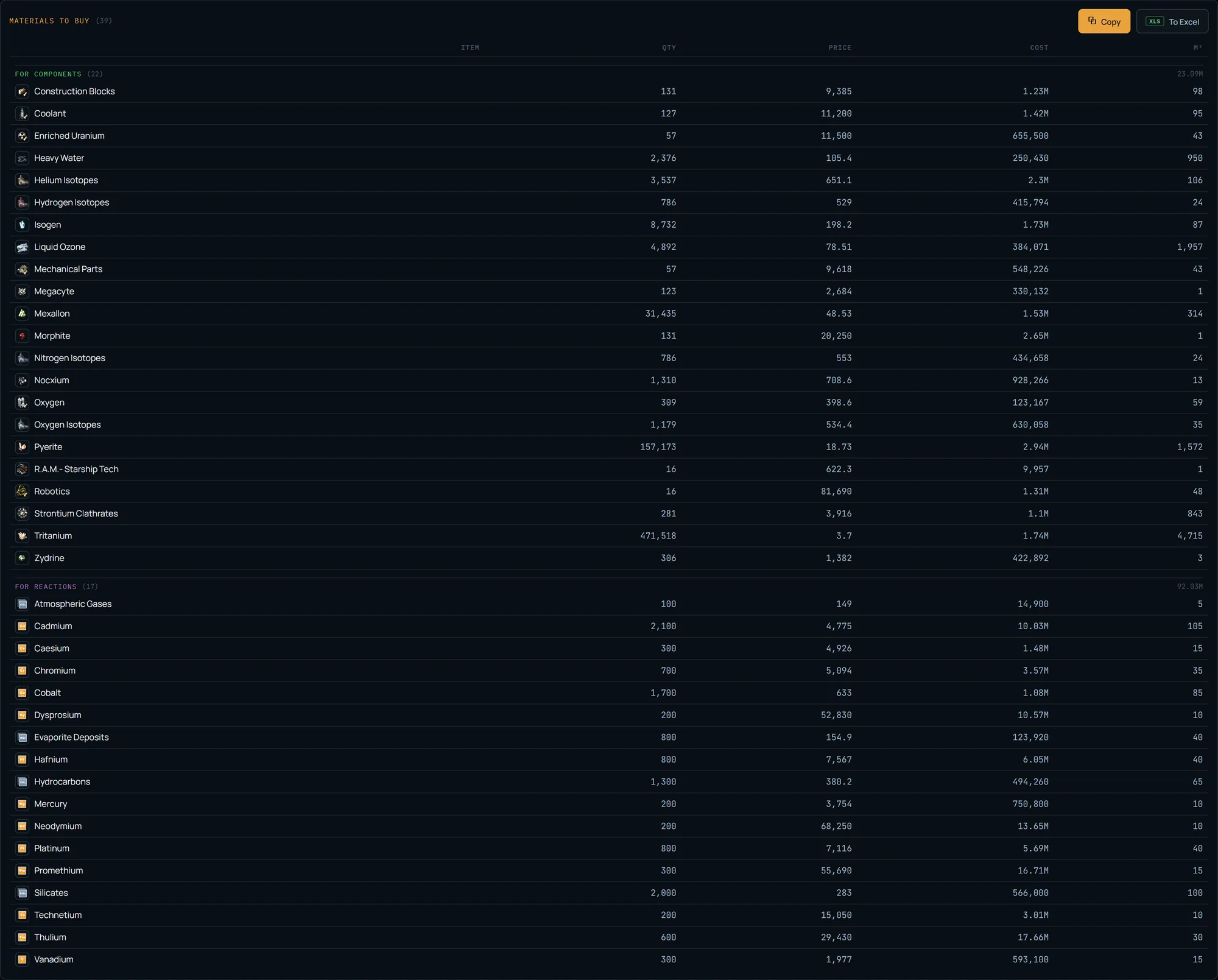
The first list is everything you buy: raw materials plus the components you chose not to build. When both components and reactions are in play, the list splits into stripes: “For components,” “For reactions,” “For both” — each with its own subtotal; a row that feeds both carries an “X comp · Y react” note. Price is shown at full precision (the sell-vs-buy gap is often in the hundredths), cost is abbreviated, plus an m³ column for logistics.
The “Copy” button hands the list off in the in-game multibuy format (name [TAB] quantity) — paste it straight into the multibuy window and buy it all at once. The names in multibuy are English: the client always understands EN. “To Excel” exports an .xlsx. The working loop is simple: copy Materials to buy → multibuy in-game → filled.
The “Components to build” list and switching right in the row
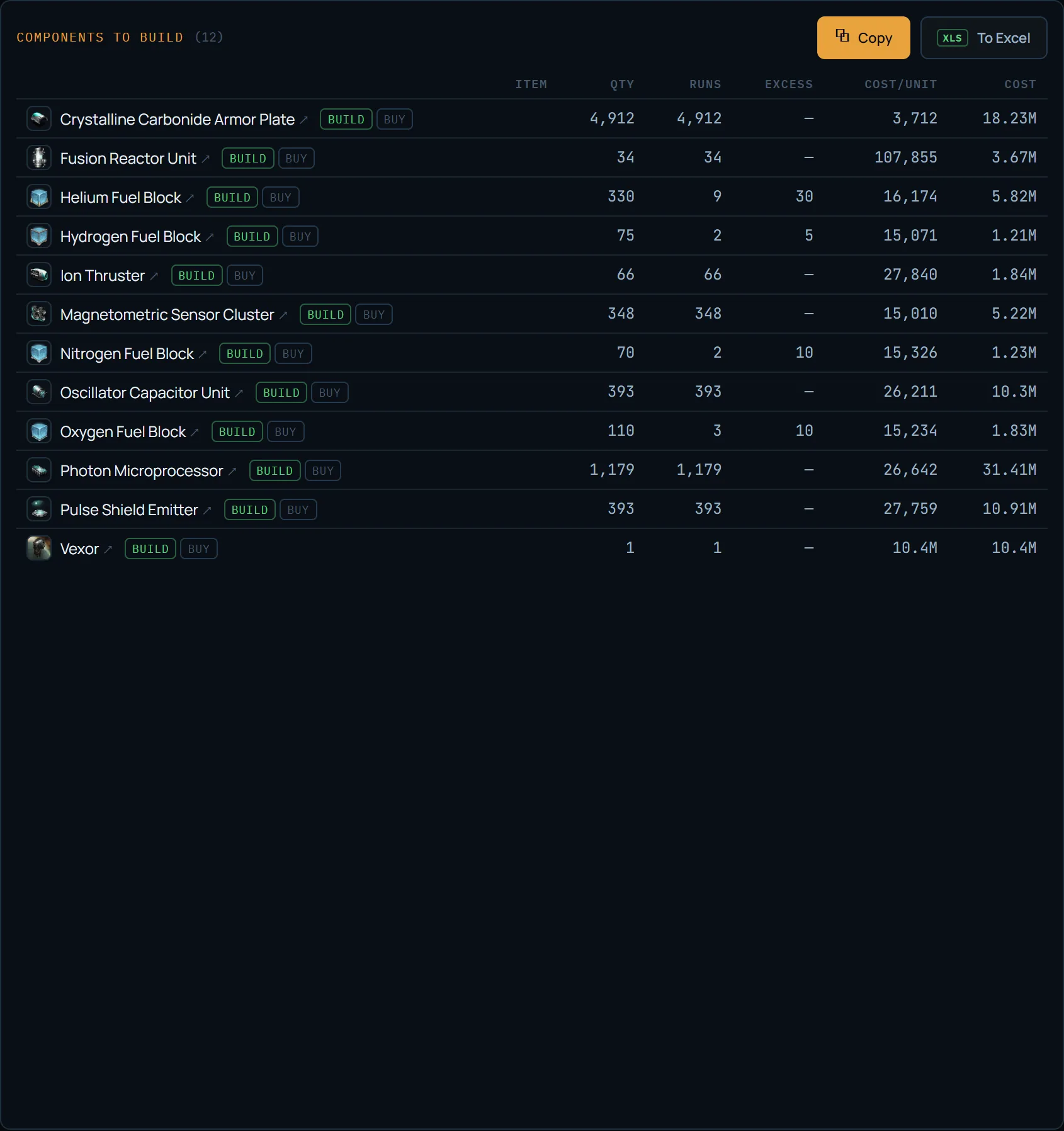
The second list is what to build at the manufacturing line: with quantity, runs, surplus and cost per unit and total. Each row has the same toggle as the tree: “build” ↔ “buy,” so you can flip a single node to buying it ready straight from the list, without expanding the tree. The ↗ icon on the name opens the component’s full calculation in a new tab.
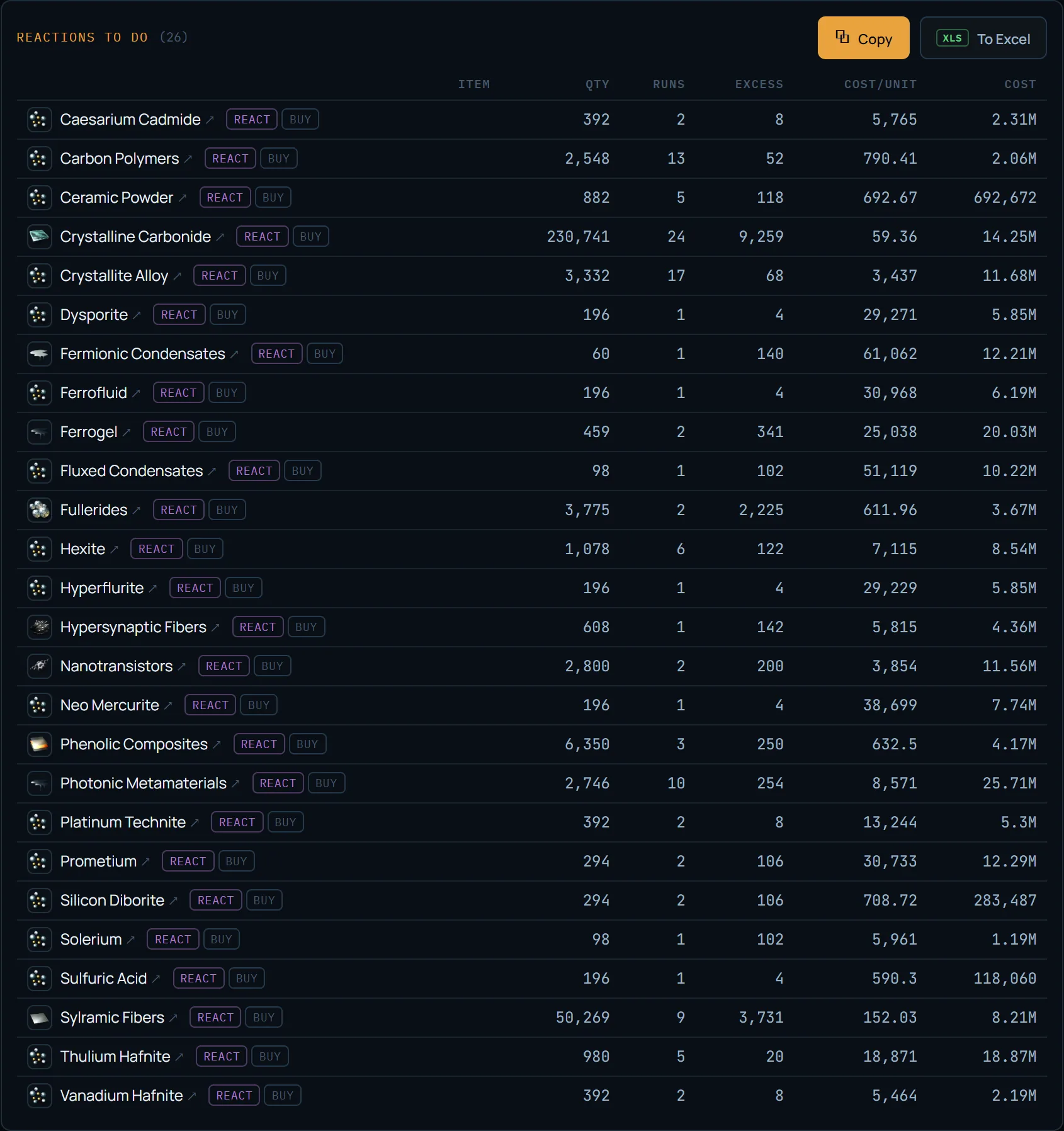
The “Reactions to do” list: what to react
The third list is reactions: the same columns (runs, surplus, cost) and a “react” ↔ “buy” toggle in the row. This is where surplus shows up most: a reaction runs in a batch and the remainder settles in storage — if you would rather not freeze cash on one ship, switch the node to “buy” or add runs. Copy and Excel export are the same as the other lists.
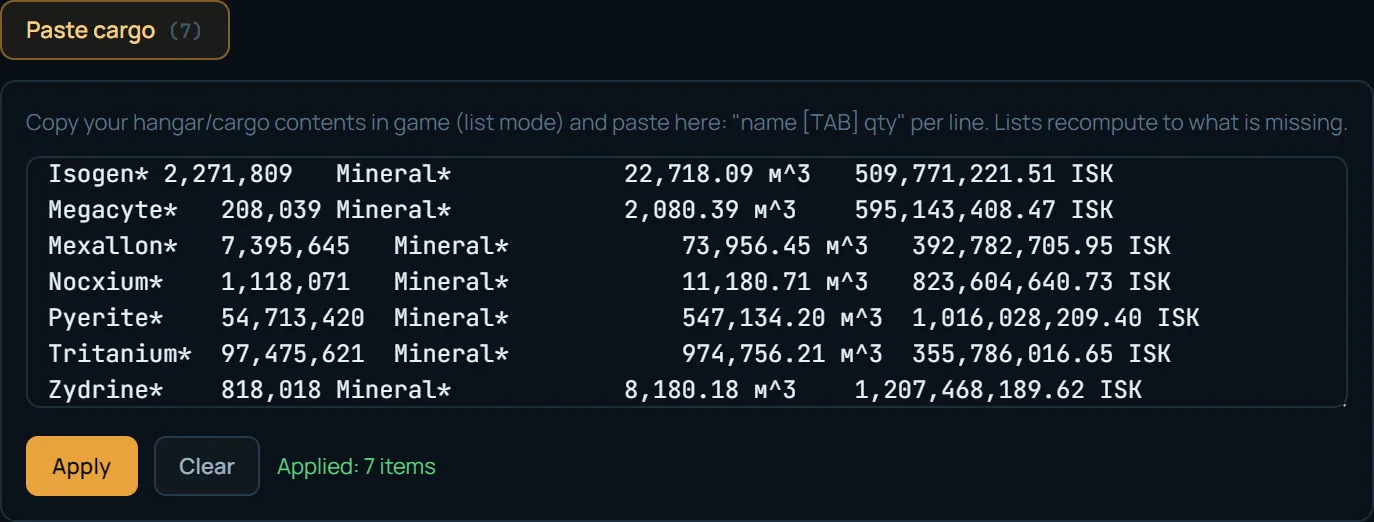
Cargo paste: what you actually still need to buy
Some materials are already in your hangar — to avoid buying extra, paste the hangar contents straight from the client. An in-game list-mode copy (name [TAB] quantity [TAB] …) pastes as-is: the parser strips the asterisks and extra columns and sums stacks. In the screenshot 7 mineral rows were counted. “Apply” recomputes the lists, “Reset” clears them.
After “Apply,” the shopping lists gain three columns: Needed / Have / To buy — you see exactly what is missing for this build given your stock. Inventory is not saved into permalinks or saved calcs: it is a one-off snapshot for the specific calculation.
Saved calcs, “Share,” and what login gives you
Setups you compute often are saved under a name: “Save” writes the current config, clicking a row loads it, “delete” removes it. Saves are tied to the character via EVE SSO, not the device — log in from another machine and the calcs are there (in the screenshot: “Charon,” “Obelisk + Purchases”). The “Share” button creates a permanent permalink with the whole config: it opens for anyone without login and reproduces the settings exactly — handy to drop into corp chat.
Logging in via EVE adds no paid features — it fills in your real skills. Sales fees are computed from Accounting, Broker Relations and standings, and job time and slot count from industry skills. Material cost does not depend on skills (post-Crius mechanics), so guest mode on public rates is enough for a quick estimate.

A batch of several items — the “Plan” mode
The “Single | Plan” switch at the top turns one item into a list of targets: several independent items with their own runs/ME, a shared assembly slot and shared component/reaction factories, one sourcing side — and one net shopping list for the whole batch (a built component shared by two items is merged into a single job). The output is consolidated lists and a roll-up with per-item profit. Free plan of up to 2 items; unlimited is in the Pro subscription. The full walkthrough with a four-battleship example is in a separate guide.
Guide: batch manufacturing plan →
Data freshness and what is out of scope for now
Material and product prices are the live book of the chosen hub, snapshotted every ~15 minutes. Adjusted prices for EIV sync once a day, system cost indices every 4 hours (the index is dynamic: it rises when everyone builds the same thing). Recipes, blueprints and systems come from the SDE, updated on game patches. Material quantities and EIV/SCC are verified against the game and a reference calculator (eveonline-industry.com): the discrepancy is 0 units.
The limits, so you do not expect more: T3 is out of scope; the price of a ready-made BPC is a config assumption, 0 by default, so for a bought T1 print the summary BPC line is usually 0 (for T2, invention works in its place, see above); the rig bonus is applied by tier without filtering by product category (conservative). The calculator costs a specific build — one item in “Single” mode or a batch in “Plan” mode; profit on what you have ALREADY built and sold, with the actual cost from your manufacturing jobs, is computed by “My Trading”.
One nuance for those who build as a corporation: jobs installed from a corp hangar (the blueprint belongs to the corporation) are not returned by ESI through a character at all — they are visible only via the corporation endpoint. That is why the Account page has a separate button to link a corporation: with a character holding the Factory Manager role (jobs) and Director (blueprints — the exact ME of your batches). Once linked, the whole corporation’s manufacturing counts toward cost basis, no matter which character installed the job — no need to link every building alt. Wallets cannot be read with a corp token (an ESI limitation), so trading characters are still linked one by one, as usual.
My Trading: profit and cost of what you built →
Cost out your own build
The calculator is free: pick an item, set the structure and system, and see the build cost, profit on both sale sides and ready shopping lists. Logging in via EVE fills in your real skills and fees.
FAQ
How does the calculator handle T2 and datacore invention?
Pick a T2 product and an “Invent the BPC” toggle appears. Switched on, it adds datacores to the buy list by expected attempts at the invention chance with skills V and puts a “BPC invention (datacores)” line in the summary. An invented BPC starts at ME2/TE4 (not ME10/TE20 like a bought T1); the “Decryptor” select consumes one per attempt and changes the chance, BPC runs and ME/TE, auto-filling the ME/TE fields.
Do skills affect the build cost?
Not the materials, since the Crius patch. Skills change only the sales fees (Accounting lowers tax, Broker Relations the broker), job time and the number of parallel slots. So the build cost is the same for a guest and a logged-in user, while profit and time are not.
Why does the install fee not drop with high ME?
The install fee is computed from EIV, and EIV uses base material quantities, ignoring ME. ME cuts the actual spend but not the estimated job value. The only way to lower the install fee is a system with a smaller cost index.
What is the difference between selling by sell order and dumping into buy orders?
By sell order — you place your own order: higher price, but you pay broker and tax and wait for a buyer. Into buy orders — you sell into someone’s order instantly: no broker, tax only, but a lower price. The calculator shows profit both ways.
Where can reactions be run?
Only in systems at 0.4 security and below — low-sec, null, wormholes. In high-sec a reactor will not start, and the calculator flags it in red. Reactions have no blueprint ME/TE; the only saving comes from the rig and the security multiplier.
What is “surplus in storage” in the summary?
Rounding overproduction: a reaction or component runs in a batch while you need less. The remainder is inventory, not a loss: it goes into later builds or to sale, so it is subtracted from cash spent and excluded from the cost of what you made.
Do corporate jobs count toward actual profit?
Yes. Jobs from a corp hangar are invisible through a character (they live on a separate ESI corporation endpoint), so a corporation is linked on the Account page with its own button — using a character that holds the Factory Manager (jobs) and Director (blueprints) roles. Once linked, “My Trading” tracks the whole corporation’s manufacturing by any character; there is no need to link every building alt. Wallets cannot be read with a corp token — trading characters are still linked one by one, as usual.